How to Create Unlimited Instagram Accounts Without Getting Banned
The exact method to create clean, ready-to-use Instagram accounts at scale — plus the faster alternative that skips all the setup and gives you aged accounts with followers already on them.
The Secret in a Nutshell
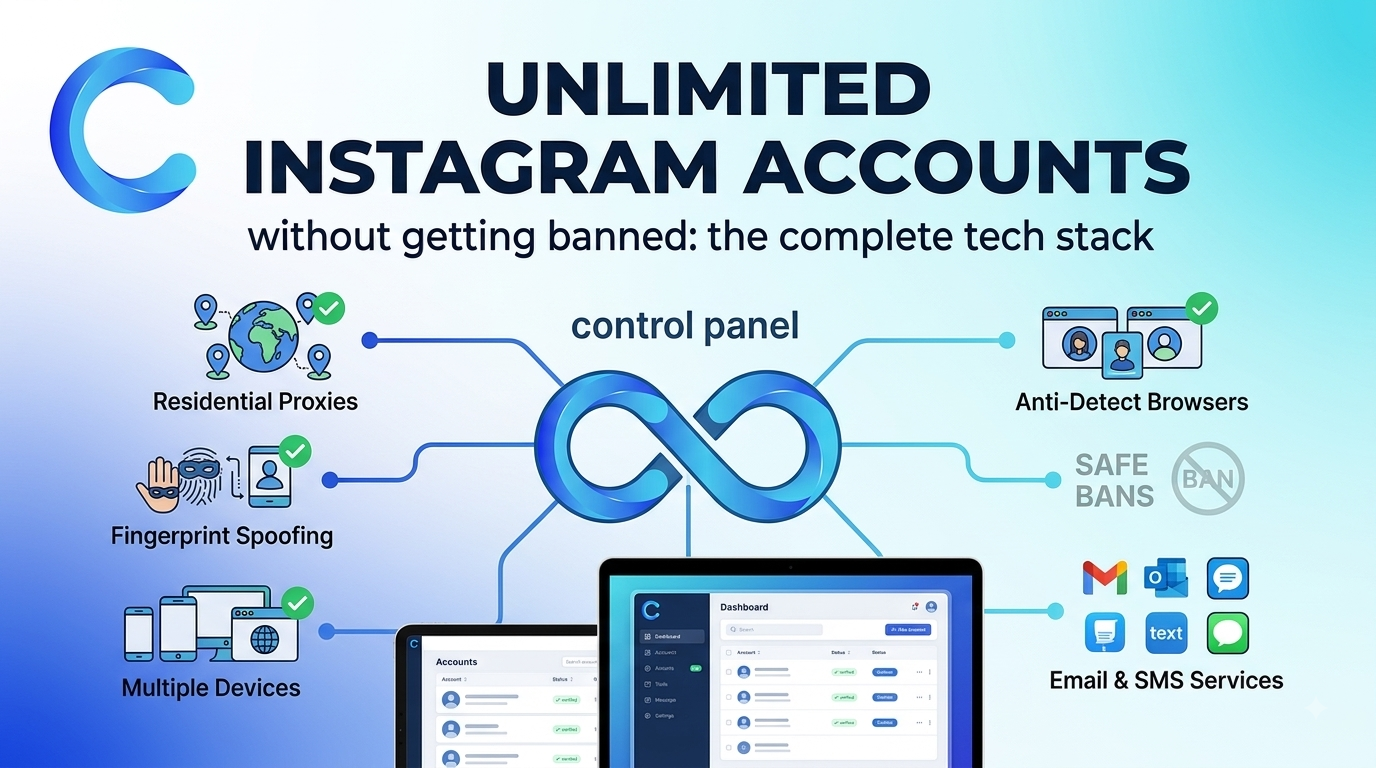
- The method: clean email + dedicated residential proxy + isolated browser profile = one undetectable Instagram account. Repeat for as many accounts as you need
- The golden rule: 1 proxy = 1 Instagram account. Never put two accounts on the same IP — that’s the single biggest reason accounts get linked and banned in waves
- After signup: wait 48 hours before doing anything. No posts, no follows, no DMs — let the account warm up on its IP first
- The shortcut: skip all of this and buy aged Instagram accounts from coldaccs.com — 2+ years old, with followers, with an aged email already on them. Ready to use immediately
Why Most People Can’t Scale Instagram Accounts — and How to Fix It
The reason most people get their Instagram accounts banned when they try to create multiple profiles isn’t the number of accounts — it’s the infrastructure. Instagram’s detection system doesn’t just track usernames. It tracks IP addresses, device fingerprints, browser environments, and behavioral patterns across every account that’s ever logged in from the same location.
Create 10 accounts from the same home IP with the same browser, and Instagram links all 10 together. Ban one and you lose all 10. The method in this guide eliminates every shared signal — a completely isolated environment for each account — which is how operators run dozens of accounts without a single one affecting the others.
The 3-Part Setup for Every Instagram Account
Each Instagram account you create needs exactly three things in place before you touch the Instagram signup page. Miss any one of these and you’re building on a foundation that will eventually get linked back to your other accounts.
| Component | What It Does | Where to Get It | Cost |
|---|---|---|---|
| Clean Email | One fresh Gmail or Outlook per account | Create free, or buy aged Gmail below | Free or from 8€ |
| Residential Proxy | Unique IP — Instagram’s primary tracking signal | webshare.io | ~$1/proxy |
| Antidetect Browser | Unique device fingerprint per account | hidemyacc.com | From $10/mo |
How to Create Unlimited Instagram Accounts — Step by Step
Every Instagram account needs its own dedicated email address. You can create Gmail or Outlook accounts for free — but if you’re scaling to 10, 20, or more Instagram accounts, creating and managing that many fresh email addresses gets tedious fast. An aged Gmail account from a specialized source is more reliable and saves significant setup time at scale.
- Create a new Gmail (gmail.com) or Outlook (outlook.com) account — completely free, one per Instagram account
- Use a different name and details for each email — don’t use variations of the same name across accounts
- Alternatively, buy aged Gmail accounts from coldaccs.com — 2+ years old, registered from different country IPs, more trustworthy than freshly created inboxes
- Never reuse the same email across multiple Instagram accounts — each account needs its own dedicated inbox
This is the most important step. Instagram tracks IP addresses more aggressively than almost any other signal. Every account must log in from a unique residential IP — never a shared proxy, never a datacenter IP, and never the same IP as another Instagram account. You need as many proxies as Instagram accounts — 10 accounts = 10 proxies, no exceptions.
- Go to webshare.io and select Private Static Residential Proxies
- Choose Custom — select the exact number of proxies you need (one per Instagram account)
- Set the IP location to USA for best results with Instagram outreach targeting English-speaking markets
- Never put 2 Instagram accounts on the same proxy — this is the single biggest cause of linked bans
Even with separate proxies, Instagram can link accounts together through browser fingerprinting — your canvas signature, WebGL renderer, screen resolution, installed fonts, and timezone all create a unique device identity that Instagram tracks across accounts. An antidetect browser creates completely isolated profiles so each account appears to come from a different device entirely.
- Get HideMyAcc from hidemyacc.com — start with a free trial to test the setup
- Create one browser profile per Instagram account — name each profile clearly
- Assign the matching residential proxy to each browser profile before any login
- Never open two Instagram accounts from the same browser profile
With your proxy and browser profile set up, you’re ready to create the Instagram account. Open your HideMyAcc browser profile — with the assigned proxy active — and sign up to Instagram using the dedicated email you prepared. The signup should look completely normal to Instagram because it’s coming from a unique IP and a unique device fingerprint.
- Open the HideMyAcc browser profile with the assigned proxy active — verify the IP is working before signing up
- Go to instagram.com and create an account using your dedicated email
- Choose a username that doesn’t match your other accounts — unique usernames per account
- Complete the signup fully — profile picture, bio — to make the account look legitimate from day one
- Do not add a phone number if you can avoid it at the creation stage — use email verification only
This is the step most people skip and it’s the reason most freshly created accounts get flagged within days. After signup, Instagram’s systems register the new account’s IP and device environment. That new environment needs 48 full hours to be recognized as normal before any activity begins. Log in, check that the account is live, then close the browser and don’t touch it for 2 days.
- After signup, log in once to confirm the account is active
- Do not post, follow anyone, like posts, send DMs, or change profile settings
- Leave the browser profile open in HideMyAcc but don’t interact with the account
- Wait a full 48 hours — not 24, not 36. The full 2 days significantly reduces early restriction risk
- After 48 hours, begin the warmup process outlined below
After the 48-hour rest, the account is ready for its first activity. The key at this stage is human behavior — slow, natural, varied. Post 1–2 pieces of content, engage with posts in your niche, follow relevant accounts. Do all of this manually without any automation tools. Automation comes later, after the account has established a genuine behavioral baseline.
- Post 1–2 images or reels in your target niche — keep them genuine and relevant
- Like 10–20 posts in your niche per session — natural browsing behavior
- Follow 10–20 relevant accounts per day — targeted, not random mass-follows
- Reply to a few comments or stories — two-way engagement looks more authentic than one-way
- No automation tools at this stage — manual activity only for the first 1–2 weeks
- After 2 weeks of clean manual activity, you can connect outreach tools like colddms.com
Skip All of This — Buy Aged Instagram Accounts Instead
The method above works — but it takes time. Creating the email, setting up the proxy, creating the browser profile, signing up, waiting 48 hours, warming up for 2 weeks before you can do anything meaningful. If you’re scaling across 10, 20, or more accounts, that’s weeks of setup before a single outreach message is sent.
The faster, stronger alternative is to buy aged Instagram accounts from coldaccs.com. These are accounts that are already 2+ years old, already have followers that add social proof and credibility, and already have an aged email registered on them. You skip the creation process, skip the 48-hour wait, and skip most of the warmup — because the account’s history has already done that work.
- Fresh — zero trust history
- New email, no history
- Zero followers at start
- 48-hour wait before any activity
- 2+ weeks warmup before outreach
- Higher early restriction rate
- Lower reply rates from prospects
- 2+ years of real account history
- Aged email already registered
- Real followers — immediate credibility
- Much shorter warmup needed
- Start outreach significantly faster
- Lower restriction risk from day one
- Higher reply rates — looks established
Buy Aged Instagram Accounts from coldaccs.com
Every account is at least 2 years old with verified activity history, real followers, and an aged email already registered on the account. Available from 8€ per account with options up to 10,000 real followers. Bulk orders supported for agencies and outreach operators. Card payment accepted, replacement guarantee included, warmup guide provided with every order.
- ✓ 2+ years of verified account history — trusted by Instagram’s systems from day one
- ✓ Real followers included — dramatically improves outreach reply rates
- ✓ Aged email already registered on the account — no fresh email setup needed
- ✓ Ready for outreach, content posting, and viral growth campaigns
- ✓ From 8€ per account — bulk orders available, card payment accepted
What to Do with Multiple Instagram Accounts
Cold outreach and lead generation
Multiple accounts let you send significantly more DMs per day without any single account hitting limits. Each account running 30–35 DMs per day adds up quickly 10 accounts means 300–350 personalized outreach messages daily. Connect automation through colddms.com after the warmup period to manage campaigns across all accounts from one dashboard.
Content posting across multiple niches
Running content accounts across different niches lets you test audiences, build brand presence in multiple markets, and grow follower bases without concentrating all growth on a single profile. Each account can develop its own niche identity and posting schedule independently.
Going viral through coordinated engagement
Aged accounts with followers and genuine engagement history have significantly better reach than fresh profiles. A post from an established account with real followers appears in the explore page and hashtag results far more reliably than content from a zero-history account created yesterday.
Agency client campaigns
Running Instagram outreach for multiple clients require separate account infrastructure per client using a client’s personal Instagram for outreach is never recommended. Aged accounts from coldaccs.com give agencies a reliable, replaceable account source for each client campaign without putting anyone’s real profile at risk.
The Rules That Keep Every Account Safe
Never put 2 Instagram accounts on the same proxy
This is the most important rule in the entire guide. Instagram links accounts that share IP addresses. If one account gets flagged, every account on that IP is at risk. One proxy per account — always. 10 accounts = 10 proxies.
Never log into two accounts from the same browser profile
Even with different proxies, sharing a browser profile creates shared fingerprint signals — canvas, WebGL, fonts, timezone — that Instagram uses to link accounts. One browser profile per account in HideMyAcc, no exceptions.
Never skip the 48-hour rest after creation or first login
The 48-hour warmup after account creation or after connecting an account to a new proxy and browser environment is non-negotiable. Instagram’s systems need time to register the new environment as normal before any activity begins. Rushing this is the most common cause of early account flags.
Never connect automation tools before manual warmup is complete
After the 48-hour rest, the account needs 1–2 weeks of manual activity posting, following, engaging before any automation tool is connected. Connecting automation immediately after creation is a fast path to restrictions, especially on freshly created accounts.
Always use a VPS to keep accounts running consistently
Running Instagram accounts from a personal laptop creates inconsistent IP signals when your machine changes networks or goes offline. A VPS from petrosky.io runs all your browser profiles 24/7 from a stable, consistent environment which Instagram reads as normal, established user behavior.
Create or Buy Either Way, Do It Right
The DIY method works when you have time and want maximum control. The aged account route works when you want to skip setup, start faster, and operate with accounts that already carry the trust signals that make outreach and content posting actually perform.
From 8€ · 2+ years old · Real followers · Aged email included · Bulk orders · Replacement guarantee
Frequently Asked Questions
Each account needs its own dedicated email, its own residential proxy IP from webshare.io, and its own isolated browser profile in HideMyAcc. Never share any of these between accounts. After creating each account, wait 48 hours before any activity. This isolation prevents Instagram from linking accounts together which is the root cause of most multi-account bans.
One proxy per Instagram account always. 10 accounts = 10 proxies. 20 accounts = 20 proxies. Never put two Instagram accounts on the same IP address. Get Private Static Residential Proxies from webshare.io at approximately $1 per proxy. Watch the setup video for the exact plan to purchase.
When a new Instagram account is created from a specific IP and device environment, Instagram’s systems register that environment. The 48-hour rest period allows that new environment to be recognized as normal before any activity begins. Accounts that start posting and following immediately after creation trigger automated detection systems even when the content itself is completely legitimate.
A fresh account starts with zero history zero trust signals for Instagram’s algorithm, zero followers, and no behavioral track record. It faces strict limits from day one and gets flagged more easily. An aged Instagram account with 2+ years of history is treated as an established, legitimate user by Instagram’s systems which means fewer restrictions, better reach, and significantly higher reply rates on outreach messages.
coldaccs.com specializes in aged Instagram accounts for outreach and content posting. Accounts are 2+ years old, come with real followers, include an aged email already registered on the account, and start from 8€ one-time. Options available up to 10,000 real followers. Bulk orders supported, card payment accepted, replacement guarantee included.
Yes coldaccs.com offers aged Instagram accounts with real follower counts ranging from starter profiles up to 10,000 followers. Accounts with followers get noticeably better outreach reply rates because prospects respond more readily to profiles that look established. A 5k follower account looks completely different to a prospect than a zero-follower profile created last week.
Yes coldaccs.com supports bulk orders across all account types. For bulk purchases, stagger your warmup start dates so each account is at a different stage of the warmup process. Give each account its own dedicated proxy and browser profile, and start 2–3 accounts per week rather than all at once for the most manageable scaling approach.
Yes Instagram fingerprints browser environments as thoroughly as it tracks IP addresses. Running multiple accounts in a regular browser, even in separate Chrome windows or profiles, creates enough shared fingerprint overlap to eventually link accounts together. HideMyAcc creates completely isolated browser environments with unique fingerprints for each account, starting from $10/month.