How to Warm Up a LinkedIn Account for Outreach
The Ultimate guide on how to Warm Up Your LinkedIn Account for Safe Cold Outreach
Quick Answer
- Warmup takes 14–30 days. Start slow with logins and light browsing, then ramp up likes, comments, and DMs gradually.
- Never go straight to full volume. Sudden spikes in activity are the #1 cause of week-1 restrictions, even on aged accounts.
- Cap weekly requests at 120. If you need more outreach volume, rent additional accounts instead of pushing one harder.
Why Warmup Matters for Cold Outreach
LinkedIn tracks how an account behaves over time. A brand-new session that suddenly sends 50 connection requests and 30 messages on day one doesn’t look like a real person — it looks like a bot. That pattern gets flagged, and the account gets restricted before your outreach campaign even gets going.
Warmup exists to avoid exactly that. By easing into activity over a couple of weeks, the account builds a usage pattern that looks like a normal professional logging in, browsing, and slowly getting more active — not a tool switched on at full speed.
LinkedIn detects abnormal behavior patterns
Its systems are built to spot activity that doesn’t match how a real person uses the platform.
New accounts are closely monitored
Less history means less trust, so new or newly active sessions get watched more carefully.
Sudden activity spikes trigger alerts
Jumping from zero to high volume overnight is one of the clearest red flags LinkedIn’s systems look for.
Gradual increase looks more natural
A slow ramp-up mirrors how a real person’s activity naturally grows over time.
Why Rent an ID-Verified Account Instead of Using Your Own?
Using your personal LinkedIn account for cold outreach means putting your real identity, your network, and your business reputation at risk every time you send a batch of messages. If that account gets restricted, you don’t just lose outreach — you lose the profile tied to your actual name and connections.
Buying an account outright carries its own risk too: if it wasn’t transferred properly, the original holder can often get it back, since the credentials change hands but the underlying ownership and verification don’t always follow cleanly.
Renting an ID-verified account solves both problems. You get a real, verified profile built specifically for outreach, your own account stays untouched, and if anything happens to the rented account, it’s the provider’s responsibility to fix or replace it — not yours.
Rent aged, ID-verified LinkedIn accounts built for prospecting and outreach. Every account includes a free Sales Navigator subscription (normally $100), and if an account ever gets restricted, our agents handle the appeal — or replace it if the appeal doesn’t work.
How Many Requests Can You Send Per Week?
LinkedIn’s limits aren’t fixed numbers — they adjust based on account health, but here’s the general range to plan around:
| Account Type | Typical Weekly Limit |
|---|---|
| Free LinkedIn account | ~50 requests/week |
| Premium / Sales Navigator | ~100–200 requests/week |
These limits move up or down depending on how healthy the account looks, so they’re a guide, not a guarantee. The bigger factor in staying safe is how you spread that volume — not just the total number.
Instead of sending everything as direct connection requests, split your activity across:
- → Group member DMs
- → Event attendee outreach
- → InMails
- → Direct DMs with connection requests
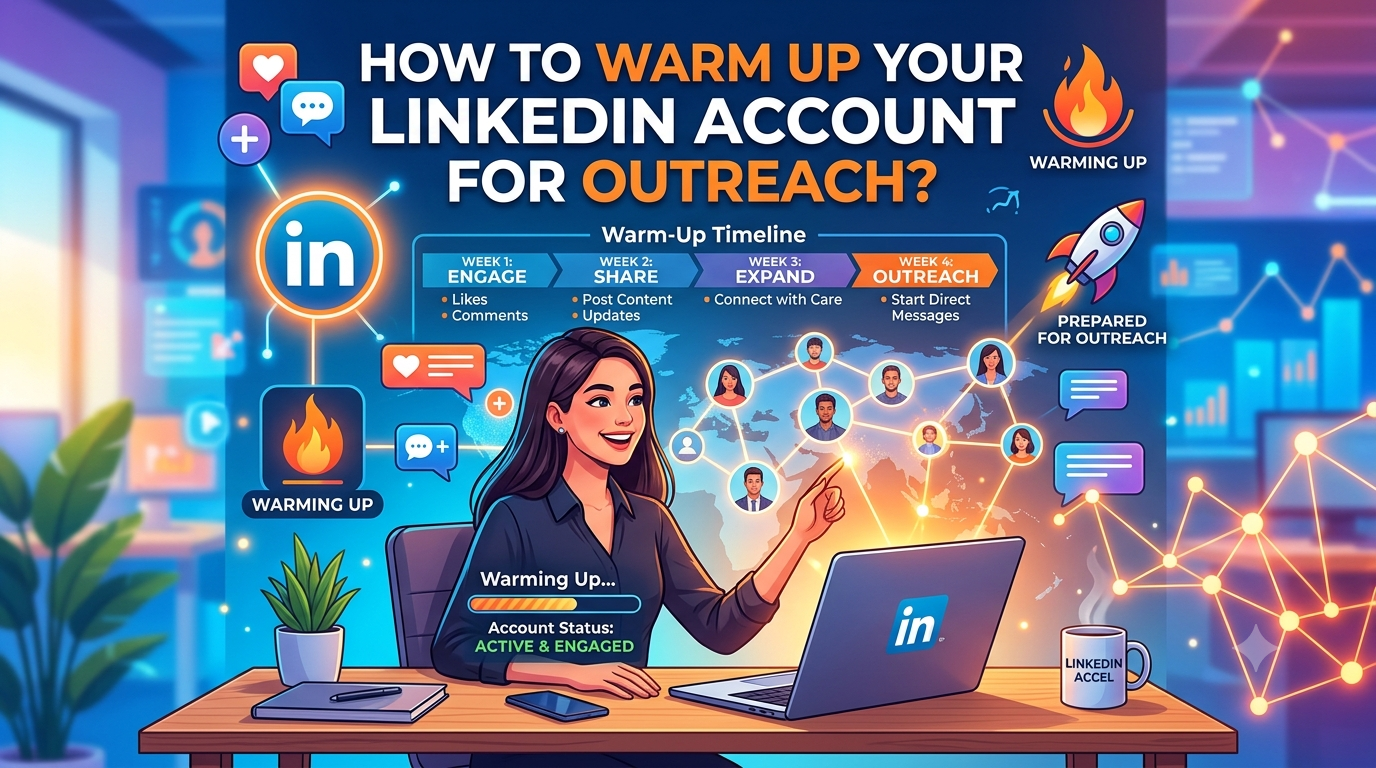
The LinkedIn Warmup Schedule, Week by Week
This is the exact ramp-up to follow on a new account. The goal in week one is simple: make it look like the session is a continuation of normal use, not a takeover.
Week 1 — Just Show Up
1–2 sessions per day, about 15 minutes each.
| Days | Action |
|---|---|
| Days 1–3 | Log in only. No likes, comments, or messages — just establish the session. |
| Days 3–7 | ~15 min/day scrolling. Add 1–3 likes and 2–4 profile views per day. |
Week 2 — Light Engagement
2 sessions per day, about 15 minutes each.
| Days | Action |
|---|---|
| Days 7–10 | Increase to 5 likes/day, up to 3 comments/day, and send 2 connection requests/day. |
| Days 10–14 | Send 5 DMs and connection requests/day, leave up to 5 comments/day. |
Week 3 — Start Real Outreach
| Days | Action |
|---|---|
| Days 14+ | Send 7–10 DMs/day, spread across groups, InMails, and events. |
| Every 2 days | Increase by 2 DMs until reaching 30-40 connection requests/day and up. |
Act Like a Real User During Warmup
Outside of the schedule above, every session should look like normal LinkedIn use:
Engage with posts
Likes and comments on relevant content, not just your own activity.
Post content occasionally
A profile that only sends messages and never posts looks one-dimensional.
Accept incoming requests
Real users build their network in both directions, not just outbound.
Reply to messages
Two-way conversation, not just outbound messages with no replies.
Visit profiles in your industry
Browsing relevant profiles is normal behavior for anyone active in their field.
Technical Setup for Warmup
Dedicated IP
One IP per account. Webshare.io’s dedicated static residential proxies work well for this.
Consistent browser fingerprint
Same device, same fingerprint every session. Dolphin Anty, hidemyacc, and AdsPower all handle this well.
Take breaks
Weekends off, or at least reduced activity. Nonstop daily activity with zero gaps doesn’t look like a real person either.
Rent an Account That’s Already Warmed Up
Every account rented from coldaccs.com goes through a full 30-day warmup before it’s ever delivered to you. That means you can start sending at week-2 volume from day one, with a free Sales Navigator subscription included and a replacement guarantee if anything goes wrong.
Rent a Pre-Warmed Account →30-day warmup included · Free Sales Navigator · Replacement guarantee
Frequently Asked Questions
A full warmup cycle takes 14 to 30 days. At coldaccs, every rented account has already gone through a 30-day warmup before delivery, so you can start sending at week-2 volume from day one. For a new account you create yourself, follow the full warmup schedule from day one.
You can rent one from coldaccs.com, which also includes the setup guides you need to start outreach right away.
Go to the rent LinkedIn accounts page, select how many connections you want, and complete the order with either crypto or card payment.
An agent will appeal the restriction on your behalf. If the appeal doesn’t succeed, the account is replaced with a new one at no extra cost.
No. You can cancel whenever you want — just give notice at least 7 days before your next billing date.
Stay under 200 requests per week to keep the account healthy. Free accounts typically handle around 50 requests per week, while Premium or Sales Navigator accounts can handle 150 to 200, though these limits shift based on account health. If you need more volume than that, it’s safer to rent an additional account than to push one account past its limit.
LinkedIn’s systems are built to detect abnormal activity patterns. An account that jumps from zero activity to high message volume overnight looks automated rather than human, which triggers restrictions. A gradual increase in activity over 1 to 3 weeks mirrors how a real person naturally uses the platform.
Renting is safer for cold outreach because it keeps your personal account, network, and identity untouched if anything goes wrong. Using your own account risks restriction on the profile tied to your real name and existing connections, while a rented, ID-verified account isolates that risk and comes with replacement support if it gets restricted.